Showing posts with label SharePoint 2010. Show all posts
Showing posts with label SharePoint 2010. Show all posts
Wednesday, September 16, 2015
SharePoint - Set Trusted Root Certificate
The SharePoint sight was not displaying, there was just a blank page and no errors. I looked at the log using the ULS Viewer and found an error message "An operation failed because the following certificate has validation errors...". To fix the problem I had to add my SSL certificate as a Trusted Certificate using the Certificate Manager Snap-in in the MMC. This site has a simple explanation on how to do it.

Monday, September 14, 2015
SharePoint - Map Missing AD Attribute to User Profile Property
There are a few Active Directory Attributes that are not listed on the "Add User Profile Property" page. To add a missing attribute you have to first add a user profile property that uses any attribute from the attribute list and then modify the entry using the SharePoint Management Shell. You need to run the Management Shell with a user account that will have right permissions or you will run into errors.
The following is an example of the script:
I tried running the script with my personal admin account instead of the farm account and ran into a lot of errors. The most interesting was executing "new-object Microsoft.Office.Server.UserProfiles.UserProfileConfigManager($serviceContext)" would set "$upManager" and then show "Successfully obtained user profile manager!" but the ConnectionManager would be empty and I would get a "Cannot index into a null array." error when executing "$synchConnection = $upManager.ConnectionManager[$connectionName]"
The following is an example of the script:
# Richrd Golebiowski
# January 12, 2012
# Run in Sharepoint Managemnt Shell as SP_Farm
$url = "http://myssp:1000" #URL of your Central Admin site.
$spsProperty = "PostOfficeBox” #Internal name of the SharePoint user profile property
$fimProperty = "postOfficeBox” #Name of the attribute in FIM/LDAP source
$connectionName = “Ad Primary Connection” #Name of the SharePoint synchronization connection

$site = Get-SPSite $url

if ($site)
{Write-Host “Successfully obtained site reference!”}
else
{Write-Host “Failed to obtain site reference”}

$serviceContext = Get-SPServiceContext($site)

if ($serviceContext)
{Write-Host “Successfully obtained service context!”}
else
{Write-Host “Failed to obtain service context”}
$upManager = new-object Microsoft.Office.Server.UserProfiles.UserProfileConfigManager($serviceContext)

if ($upManager)
{Write-Host “Successfully obtained user profile manager!”}
else
{Write-Host “Failed to obtain user profile manager”}
$synchConnection = $upManager.ConnectionManager[$connectionName]

if ($synchConnection)
{Write-Host “Successfully obtained synchronization connection!”}
else
{Write-Host “Failed to obtain user synchronization connection!”}

Write-Host “Adding the attribute mapping…”
$synchConnection.PropertyMapping.AddNewMapping([Microsoft.Office.Server.UserProfiles.ProfileType]::User, $spsProperty, $fimProperty)
Write-Host “Done!”
I tried running the script with my personal admin account instead of the farm account and ran into a lot of errors. The most interesting was executing "new-object Microsoft.Office.Server.UserProfiles.UserProfileConfigManager($serviceContext)" would set "$upManager" and then show "Successfully obtained user profile manager!" but the ConnectionManager would be empty and I would get a "Cannot index into a null array." error when executing "$synchConnection = $upManager.ConnectionManager[$connectionName]"
Wednesday, March 12, 2014
SharePoint - Database Cleanup
From what I've read it seems that one of the common things that can happen when you're working with SharePoint is that you end up with orphaned databases on your SQL server or in SharePoint. Here are some PowerShell commands to help clear that up.
List all databases that are being used by SharePoint:
List all databases that are being used by SharePoint that are not on the database:
List all databases that are being used by SharePoint:
Get-SPDatabase | Sort-Object disksizerequired -desc | Format-Table NameUse the returned list to compare with the databases on your SQL server and delete any databases that are not on the list.
List all databases that are being used by SharePoint that are not on the database:
Get-SPDatabase | where {$_.exists -eq $false}
Delete the orphaned databases:
Get-SPDatabase | where {$_.exists -eq $false} | foreach {$_.delete()}
Tuesday, March 11, 2014
SharePoint - Is It SharePoint Search Or FAST Search
If you set up your SharePoint site to use FastSearch and you want to make sure that your SharePoint site is using FAST run the "Get-SPEnterpriseSearchExtendedQueryProperty" PowerShell command. If you have FAST set up correctly you should see something like this:
PS C:\> Get-SPEnterpriseSearchExtendedQueryProperty -SearchApplication "Search Service Application"

PropertyKey                               Value
-----------                               -----
FASTSearchContextProperties               SPS-Location,SPS-Responsibility
FASTSearchAdminServiceAuthenticationUser  comp\svc_spadmin
FASTSearchAdminServiceLocation            http://intranet.contoso.com:13257
FASTSearchQueryServiceLocation            http://intranet.contoso.com:13287
FASTSearchContextCacheTimeout
FASTSearchManagedPropertyResultMapping
FASTSearchDisableUserContext
FASTSearchResourceStoreLocation           http://intranet.contoso.com:13255
FASTSearchAlternateAccessMapProperties
PropertyKey                               Value
-----------                               -----
FASTSearchContextProperties               SPS-Location,SPS-Responsibility
FASTSearchAdminServiceAuthenticationUser
FASTSearchAdminServiceLocation
FASTSearchQueryServiceLocation
FASTSearchContextCacheTimeout
FASTSearchManagedPropertyResultMapping
FASTSearchDisableUserContext
FASTSearchResourceStoreLocation
FASTSearchAlternateAccessMapProperties
SharePoint - Check Content Source Connection
The Windows PowerShell for Search Server 2010 reference can be found at technet. I was troubleshooting our FAST setup and used the "Ping-SPEnterpriseSearchContentService" to check if I could reach the content source from our SharePoint server.
Here is my result. If you scroll to the right you will see one line for the FASTSeachCert has true for ConnectioSuccess.
ping-spenterprisesearchcontentservice -hostname fastsearch.mydomain.local:13391
Here is my result. If you scroll to the right you will see one line for the FASTSeachCert has true for ConnectioSuccess.
CertificateName                      Thumbprint                          ExpiryDate                       ConnectionSuccess
---------------                      ----------                          ----------                       -----------------
No certificate                       No certificate                      None                             False
CN=ForefrontIdentityManager          47FA1E8786C5E940887F10176FEFA88A... 12/31/2039 6:59:59 PM            False
SERIALNUMBER=77961234, CN=Go Dadd... 7C4656C3061F7F4C0D67B319A855F60E... 11/15/2026 8:54:37 PM            False
OU=Go Daddy Class 2 Certification... DE70F4E2116F7FDCE75F9D13012B7E68... 6/29/2024 1:06:20 PM             False
CN=WMSvc-MOSS                        BEE607B03C17EBC1075F7F8708C334B5... 6/25/2020 9:39:36 AM             False
E=info@valicert.com, CN=http://ww... 317A2AD07F2B335EF5A1C34E4B57E8B7... 6/25/2019 8:19:54 PM             False
CN=*.mydomain.org, OU=Domain Con...  370441FEFE89736CA69A611E45B0D7A6... 3/23/2017 5:26:48 PM             False
CN=FASTSearchCert                    2E76CBC921BEF69387E89C9152848AB2... 3/10/2015 11:16:27 AM             True
CN=FASTSearchCert                    443B3C48B3182409E7E2D7906397B175... 11/15/2014 10:57:28 AM           False
CN=FASTSearchCert                    DAD3BBABB12E1F4F309B591761993B71... 11/4/2014 3:02:53 PM             False
CN=mysite.mydomain.org, OU=Domai...  51205810A0700BB6F03A138746B682AF... 3/22/2013 4:05:18 AM             False
Sunday, March 9, 2014
Delete A Service Application In SharePoint
I needed to delete a service application in SharePoint. Tried to delete it using Central Admin and PowerShell and neither one worked. Good old Staadm was able to delete it. Here is the command:
You can find the ID of the service application in the address bar of Central Admin: You can find the ID using PowerShell:
stsadm.exe -o deleteconfigurationobject -id "87349a22-0cd6-4b35-b420-78fa2dff8c26"
You can find the ID of the service application in the address bar of Central Admin:

PS C:\Users\argolebiowski> Add-PSSnapin Microsoft.SharePoint.PowerShell
PS C:\Users\argolebiowski> Get-SPServiceInstance -server moss

TypeName                         Status   Id
--------                         ------   --
Managed Metadata Web Service     Online   c0b5f68e-424c-434f-8e06-71960fe6afe6
User Profile Synchronization ... Online   5ffb0768-ec34-4186-bb72-6c28faced877
Business Data Connectivity Se... Online   09549ad7-bc47-491c-9d73-bfb588c1a8c7
Secure Store Service             Online   4a14360b-3fba-4f90-83f9-97e03eded38d
Claims to Windows Token Service  Disabled 2ea5d177-7e5f-4b90-a3cb-8ed5c65d4e3c
Microsoft SharePoint Foundati... Online   fe30e019-4353-4560-9c8c-90584f8161ac
PerformancePoint Service Online c1d2e240-7186-446d-8b1a-24e5ecddd02cWednesday, April 24, 2013
SharePoint - Duplicate Content Error
This was a strange problem! A user tried to activate the "SharePoint Server Publishing Infrastructure" feature and received an error saying "A duplicate content type named "Report" was found." In addition to this problem there were a couple of features that were enabled for testing that I was unable to disable.
The problem was fixed by disabling the two features circled below:

Once these two feature were deactivated the "SharePoint Server Publishing Infrastructure" feature could be activated.
The problem was fixed by disabling the two features circled below:

Once these two feature were deactivated the "SharePoint Server Publishing Infrastructure" feature could be activated.
Friday, January 18, 2013
SharePoint 2010 - Fast Search Disk Space Problem
The organization I work for uses Fast Search and the drive where the search index is being stored was running low on disk space. I thought it was the index itself that was growing but as it turned out my problem was being caused by click-through. The folder, "...data\sprel\worker\build_proc", was being filled with files. I used the "spreladmin" utilty to stop the process and deleted the files. So far I have not been able to figure out what is causing the problem and since, in our case, there isn't much of a benefit in using click-through I just decided to leave the service off. I did discover some nice command-line tools for working with Fast Search Server. You can find them here.
Friday, October 19, 2012
SharePoint 2010 - External List Authentication
Another thing that constantly gets me - whenever you set up an secure store application and do not set it up as a group type (individual is the default) you will get the "Click here to authenticate" link on the list in SharePoint!
SQL - Table Changes and Views
One of the things that I still get hung up on is the need to update table views when I add or delete columns. The most common thing that happens is a "field not found" type of error. Then yesterday I was working in SharePoint designer and received an error that said "View or function 'XXX.dbo.vwXXX' has more column names specified than columns defined". Doing an ALTER view is SQL manager solved the problem.
Tuesday, September 25, 2012
SharePoint 2010 - Fast Search "Failed to connect..." Error
This was just one of the many problems I had to deal with today! One of the common things that happens with a Fast Search setup is to have your self-signed certificate expire after one year. When this happens, you will get the following error in the application error log of your SharePoint server:
The solution is simple enough, just install a new certificate!
Here are some helpful sites:
SharePoint Malarkey
SharePoint Fanatic
FAST Forum
Microsoft
Microsoft TechNet
Failed to connect to SERVER.com:XXXX Failed to initialize session with document engine: Unable to resolve Contentdistributor
The solution is simple enough, just install a new certificate!
Here are some helpful sites:
SharePoint Malarkey
SharePoint Fanatic
FAST Forum
Microsoft
Microsoft TechNet
Friday, May 11, 2012
Using SQL to make a SharePoint Contact List
I needed to make a list of contact information for all of our offices using the contact information in Active Directory. All of the "regular" solutions were not applicable because the offices were contained in the same Organizational Unit as some other contacts, requiring the offices be filtered out from the other contacts. The solution was to use the SQL server that is used to host the databases for the SharePoint site to query AD and return the filtered list.
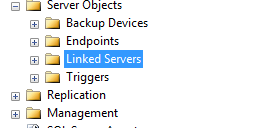
The first step is to create the SQL Linked server. I used SQL Management Studio to do this. Under "Server Objects, right click on "Linked Servers" and the click "New Linked Server".
Here are the settings you need to make. The "Data Source" is the name of your AD server.

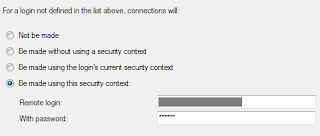
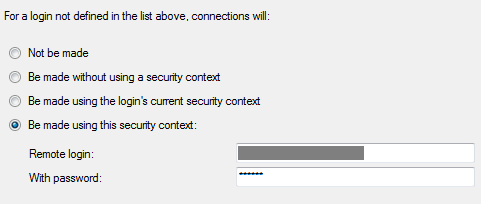
On the "Security" page, enter the security settings:
Create the view:
Finally, add the view into SharePoint as an external data source and use it in your SharePoint list!
The first step is to create the SQL Linked server. I used SQL Management Studio to do this. Under "Server Objects, right click on "Linked Servers" and the click "New Linked Server".

Here are the settings you need to make. The "Data Source" is the name of your AD server.

On the "Security" page, enter the security settings:
Create the view:
CREATE VIEW [dbo].[vwWxyzOffices]
AS
SELECT sn[Country], homephone[Business Phone], l[City], streetAddress[Street Address], postalCode[Postal Code],
mail[Email], facsimileTelephoneNumber[Fax], mobile[Mobile Phone], info[Notes], wWWHomePage[Website]
FROM OPENQUERY(ADSI,
'SELECT givenName, sn, homephone, l, streetAddress, postalCode, facsimileTelephoneNumber,
mail, mobile, info, wWWHomePage
FROM ''LDAP://OU=Contacts,DC=Wxyz,DC=local''
WHERE objectClass = ''contact''  and givenName = ''Wxyz''')
GO
Finally, add the view into SharePoint as an external data source and use it in your SharePoint list!
Thursday, February 23, 2012
SharePoint 2010 - Could not allocate space for object
The day was going along great when all of a sudden a lot of users were experiencing problems with our SharePoint site. I checked the SharePoint log file using the ULS viewer and with the correlation id from one of the errors I found this entry:
Turns out our SQL server is configured to do a daily backup to the same drive as the SQL database files and the drive was full after three months of backups. Isn't that just brilliant! There was no room for the database to grow. I removed some of the old backup files to free up some space and things were back to normal. Just to make sure this problem didn't happen again before we found the time to make this right, I added a cleanup task onto the backup maitenance job so that backup files older then 4 weeks would be deleted.
System.Data.SqlClient.SqlException: Could not allocate space for object 'dbo.AllUserData'.'AllUserData_ParentId' in database 'Insite_Content' because the 'PRIMARY' filegroup is full. Create disk space by deleting unneeded files, dropping objects in the filegroup, adding additional files to the filegroup, or setting autogrowth on for existing files in the filegroup.
at System.Data.SqlClient.SqlConnection.OnError(SqlException exception, Boolean breakConnection)
at System.Data.SqlClient.TdsParser.ThrowExceptionAndWarning(TdsParserStateObject stateObj)
at System.Data.SqlClient.TdsParser.Run(RunBehavior runBehavior, SqlCommand cmdHandler, SqlDataReader dataStream, BulkCopySimpleResultSet bulkCopyHandler, TdsParserStateObject stateObj)
at System.Data.SqlClient.SqlDataReader.HasMoreRows()
at System.Data.SqlClient.SqlDataReader.ReadInternal(Boolean setTimeout)
at System.Data.SqlClient.SqlDataReader.NextResult()
at Microsoft.SharePoint.SPSqlClient.ExecuteQueryInternal(Boolean retryfordeadlock)
at Microsoft.SharePoint.SPSqlClient.ExecuteQuery(Boolean retryfordeadlock)
Turns out our SQL server is configured to do a daily backup to the same drive as the SQL database files and the drive was full after three months of backups. Isn't that just brilliant! There was no room for the database to grow. I removed some of the old backup files to free up some space and things were back to normal. Just to make sure this problem didn't happen again before we found the time to make this right, I added a cleanup task onto the backup maitenance job so that backup files older then 4 weeks would be deleted.
Friday, February 17, 2012
SharePoint 2010 - Add a Missing User Profile Property Attribute for Export
It was another one of those Thursdays! Yesterday I was trying to add a missing AD schema attribute to a User Profile Property for export using the AddNewExportMapping command in PowerShell which resulted in the following error:

Funny thing was that the attribute was still added to the property, but as an Import! In the end it was a good thing because I ended up learning more about the Synchronization Service Manager. Turns out that adding the attributes is a lot easier using this application and you get a nice view to confirm that they are indeed there! Here's how to do it. On your SharePoint server run the Synchronization Service Manager, miisclient.exe. In articles you will also find it referred to as SSM or the FIM client. It is located in the C:\Program Files\Microsoft Office Servers\14.0\Synchronization Service\UIShell folder.
Select your connection:

Then right click and select properties:

Select "Configure Attribute Flow":
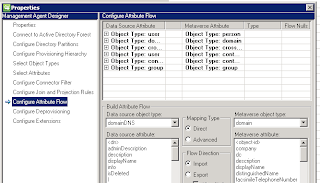
Then select the appropriate group. In my case the "Data Source Attribute" with "Object Type" user" and "Metaverse Attribute" with "Object Type: person". Then in the "Build Attribute Flow" section select the "Data source attribute" and the corresponding "Metaverse attribute" and in the "Flow Direction" section select your desired direction settings:

When you have made your selections, click "New" to add the mapping.

Funny thing was that the attribute was still added to the property, but as an Import! In the end it was a good thing because I ended up learning more about the Synchronization Service Manager. Turns out that adding the attributes is a lot easier using this application and you get a nice view to confirm that they are indeed there! Here's how to do it. On your SharePoint server run the Synchronization Service Manager, miisclient.exe. In articles you will also find it referred to as SSM or the FIM client. It is located in the C:\Program Files\Microsoft Office Servers\14.0\Synchronization Service\UIShell folder.
Select your connection:

Then right click and select properties:

Select "Configure Attribute Flow":

Then select the appropriate group. In my case the "Data Source Attribute" with "Object Type" user" and "Metaverse Attribute" with "Object Type: person". Then in the "Build Attribute Flow" section select the "Data source attribute" and the corresponding "Metaverse attribute" and in the "Flow Direction" section select your desired direction settings:

When you have made your selections, click "New" to add the mapping.
Thursday, February 16, 2012
SharePoint 2010 - Reorder User Profile Properties
Changing the display order of profile properties in SharePoint is a real PITA. There are some scripts you can find on the web to make it easier, but from what I've read people have had mixed results using those scripts. A way that I found that is easy and definitely works is to change the value of the display order in the database table, ProfileSubtypePropertyAttributes, in the Profile database using SQL Manager.
The following SQL script will list the properties along with the display order.
The script will give you a listing like this:

The following update script changes the display order of the property with the propertyID, 10013, to 5304. Note that the numbering for the DisplayOrder field does not have to be sequential. The screen shot above shows the property with the new display order value.
The following SQL script will list the properties along with the display order.
SELECT TOP 1000 [ProfileSubtypeID]
      ,[ProfileSubtypePropertyAttributes].[PropertyID]
      ,[PropertyList].[PropertyName]
      ,[PropertyList].[isSection]
      ,[DisplayOrder]
FROM [Profile DB].[dbo].[ProfileSubtypePropertyAttributes]
join [Profile DB].[dbo].[PropertyList] on propertyList.propertyid = [ProfileSubtypePropertyAttributes].propertyid  where [ProfileSubtypeID] = 1
order by [DisplayOrder]
The script will give you a listing like this:

The following update script changes the display order of the property with the propertyID, 10013, to 5304. Note that the numbering for the DisplayOrder field does not have to be sequential. The screen shot above shows the property with the new display order value.
update [Profile DB].[dbo].[ProfileSubtypePropertyAttributes]
set DisplayOrder = 5304
where propertyID = 10013
Wednesday, February 15, 2012
SharePoint 2010 - New AD Property Not Displayed
If you add a new User Profile Property and it's coming from the Active Directory the property will not be displayed on the My Sites edit profile page until you do a profile synchronization.
Friday, February 10, 2012
Microsoft Virtual Labs - Unable to register person
This morning I tried to go to one of the Microsoft virtual labs. You can find them here. This site is a great resource. Anyway, when I click on the "Launch Virtual Lab" button everything ran fine until just after the "Checking ActiveX Control" part at the end when I received a message saying "Unable to register person". I went back top the
launch screen and clicked "View System Requirements:

then clicked on Firewall:

The start-up of the lab launched just fine!

then clicked on Firewall:

The start-up of the lab launched just fine!
Saturday, February 4, 2012
SharePoint 2010 - Web Services Root Site
If you look at your sites in IIS Manager you will see the root site. This site provides some services for SharePoint such as the Security Token Service on SSL enabled, site search, and My Sites. SharePoint handles turning this site on or off as needed so you may see this site turned off. SharePoint does a good job of handling this in general but in some cases this site could get turned off inadvertantly and you may get and error in the SharePoint Logs such as
on SSL enable sites or a message such as
in health analysis.
Could not connect to http://localhost:32843/SecurityTokenServiceApplication/securitytoken.svc
on SSL enable sites or a message such as
"Error: The Security Token Service is not available. The Security
Token Service is not issuing tokens. The service could be malfunctioning
or in a bad state."
in health analysis.
Saturday, January 14, 2012
SharePoint 2010 - Mapping missing LDAP atrributes
Ran into a problem when I was adding user properties for the user profile in SharePoint 2010. Followed the instructions found at http://trayontheweb.com/2011/07/20/missing-ldap-attributes-when-adding-a-new-property-to-the-user-profile-service-in-sharepoint-2010/ and I was able to add a property for the missing attribute. Had to run SharePoint PowerShell with SP_Farm credentials. Ran synchronization and the field was populated. Additional information can be found at http://blogs.msdn.com/b/tehnoonr/archive/2010/11/22/mapping-user-profile-properties-in-sharepoint-2010-to-ldap-attributes.aspx
Subscribe to:
Posts (Atom)