 /**
  *
  * @param groupName The name of the AD group.
  * @return The AD attributes for the group or null if error.
  * @throws NamingException
  */
    public Attributes getADGroupAttributes(String groupName) throws NamingException {
     this.userName = null;
        String searchFilter = "(&(objectClass=group)(cn=" + groupName + "))";
        SearchControls searchControls = new SearchControls();
        searchControls.setSearchScope(SearchControls.SUBTREE_SCOPE);
        NamingEnumeration  results = ctx.search("dc=MYDOMAIN,dc=LOCAL", searchFilter, searchControls);
        SearchResult searchResult = null;
        if(results.hasMoreElements()) {
             searchResult = (SearchResult) results.nextElement();
            //make sure there is not another item available, there should be only 1 match
            if(results.hasMoreElements()) {
                this.strRes = "Matched multiple groups for the group name: " + groupName;
                return null;
            }
        }
        else{
            this.strRes = "No groups found";
            return null;
        }
        return searchResult.getAttributes();
    }

    /**
     *
     * @param groupName The group name to search for. Can use wild cards.
     * @return A comma delimited list of the AD group names
     * @throws NamingException
     */
    public String searchforADGroup(String groupName) throws NamingException {
     this.userName = null;
        String searchFilter = "(&(objectClass=group)(cn=" + groupName + "))";
        SearchControls searchControls = new SearchControls();
        searchControls.setSearchScope(SearchControls.SUBTREE_SCOPE);
        NamingEnumeration  results = ctx.search("dc=MYDOMAIN,dc=LOCAL", searchFilter, searchControls);
        SearchResult searchResult = null;
        String strGroups = "";
        if(results!= null) {
         try {
    while(results.hasMore()) {
     searchResult = (SearchResult) results.nextElement();
     strGroups = strGroups + searchResult.getAttributes().get("cn") + ",";
    }
   } catch (Exception e) {

   }
        }
        else{
            this.strRes = "No groups found";
            return null;
        }
        return strGroups;
    }
Showing posts with label Active Directory. Show all posts
Showing posts with label Active Directory. Show all posts
Thursday, October 8, 2015
Java - Search for AD Groups and List Group Attributes
Added the ability to search for AD groups and get a Group's Attributes to my LDAP class:

Tuesday, October 6, 2015
Java - Secure LDAP - simple bind failed: internews.local:636 Error
This took me a while to fix because I had to get the right certificates to install in the Java certificate store on the new server. I finally found the "cer" files on one of the domain controllers, copied the files to the new server, and then used the Java keytool utility to import the certificates into the Java certificate store.
Some tips:
Use "keytool.exe" located the the Java bin folder to import the certificates.
Import the certificates into the "cacerts" file located in the security folder under "jre\lib\security".
Some tips:
Use "keytool.exe" located the the Java bin folder to import the certificates.
Import the certificates into the "cacerts" file located in the security folder under "jre\lib\security".
Saturday, August 29, 2015
Java - Authenicate against Active Directory
It turns out it's very easy using JNDI to authenticate someone against Active Directory.
/**
 * Authenticate against AD
 * @param username The user name
 * @param password The password
 * @return True if authenticate
 */
@SuppressWarnings({ "unchecked", "rawtypes" })
public boolean authenicate(String username, String password){
 boolean bRes = true;
 ResourceBundle rsBun = ResourceBundle.getBundle("LDAP_Res");
 Hashtable env = new Hashtable();
 env.put(Context.INITIAL_CONTEXT_FACTORY,"com.sun.jndi.ldap.LdapCtxFactory");
 //Use the secure connection
 env.put(Context.PROVIDER_URL, rsBun.getString("urls"));
 //Add the domain name if the user name does not contain it
 if (username.indexOf(rsBun.getString("domain")) == -1){
  username = rsBun.getString("domain") + "\\" + username;
 }
 env.put(Context.SECURITY_PRINCIPAL, username);
 env.put(Context.SECURITY_CREDENTIALS, password);
 try {
  LdapContext ctx = new InitialLdapContext(env,null);
  ctx.close();
 } catch (NamingException e) {
  bRes = false;
 }
 return bRes;
}
Friday, November 2, 2012
Java - Missing User When Querying Active Directory
In an application that I'm working on I'm using the "DirContext" to query Active Directory for users and permissions. A new user wasn't showing up in the query results. It turned out that since I was filtering my search on the City and he was set up without having an entry for City he wouldn't be returned in the search.
Wednesday, May 2, 2012
JNDI - Read Active Directory User Information
Today I needed to read in some user information from Active Directory so that I could create entries for each user and the uers group meberships in a SQL table.
Here is the code I used for testing:
All you need to do is provide your own connection settings in the connect method. I'm getting mine from a properties file.
This is my test method calling the methods in the class above:
Here is the code I used for testing:
package org.inewsnet.ldap;

import java.util.Enumeration;
import java.util.Hashtable;
import java.util.ResourceBundle;
import javax.naming.Context;
import javax.naming.NamingEnumeration;
import javax.naming.NamingException;
import javax.naming.directory.Attribute;
import javax.naming.directory.Attributes;
import javax.naming.directory.DirContext;
import javax.naming.directory.InitialDirContext;
import javax.naming.directory.SearchControls;
import javax.naming.directory.SearchResult;

public class LdapJndi{
    @SuppressWarnings("rawtypes")
    Hashtable env;
    DirContext ctx;

    @SuppressWarnings({ "unchecked", "rawtypes" })
    public boolean  connect(){
        boolean bRes = true;
        ResourceBundle rsBun = ResourceBundle.getBundle("LDAP");
        env = new Hashtable();
        env.put(Context.INITIAL_CONTEXT_FACTORY,"com.sun.jndi.ldap.LdapCtxFactory");
        env.put(Context.PROVIDER_URL, "ldap://" + rsBun.getString("server") + ":" +
           rsBun.getString("port") + rsBun.getString("root"));
        env.put(Context.SECURITY_AUTHENTICATION, "simple");
        env.put(Context.SECURITY_PRINCIPAL, "cn=" + rsBun.getString("principal"));
        env.put(Context.SECURITY_CREDENTIALS, rsBun.getString("credentials"));
        try {
            ctx = new InitialDirContext(env);
        } catch (NamingException e) {
            e.printStackTrace();
            bRes = false;
        }
        return bRes;
    }

    public static String getCN(String cnName) {
        if (cnName != null && cnName.toUpperCase().startsWith("CN=")) {
            cnName = cnName.substring(3);
        }
        int position = cnName.indexOf(',');
        if (position == -1) {
            return cnName;
        } else {
            return cnName.substring(0, position);
        }
    }

    public static String getUserName(String upn) {
        int position = upn.indexOf('@');
        return upn.substring(0, position);
    }

    @SuppressWarnings("rawtypes")
    public boolean testNetworkRead() {
        boolean bRes = false;
        String firstName;
        String lastName;
        String userName;
        ResourceBundle rsBun = ResourceBundle.getBundle("LDAP");
        String bsaeOU = "ou=" + rsBun.getString("baseOU");
        SearchControls sc = new SearchControls();
        String[] attributeFilter = {"memberOf", "userPrincipalName", "sn", "givenName",  "cn", "mail" };
        sc.setReturningAttributes(attributeFilter);
        sc.setSearchScope(SearchControls.SUBTREE_SCOPE);
        String filter = "(&(sn=*)(l=*))";

        try {
            NamingEnumeration results = ctx.search(bsaeOU, filter, sc);
            Integer iCx = 0;
            while (results.hasMore()) {
                SearchResult sr = (SearchResult) results.next();
                Attributes attrs = sr.getAttributes();
                iCx = iCx + 1;
                System.out.print(iCx + ")");
                Attribute attr = attrs.get("sn");
                lastName = attr.get().toString();
                System.out.print("ln= " + lastName);
                attr = attrs.get("givenName");
                if (attr != null) {
                    firstName = attr.get().toString();
                    System.out.print(" fn= " + firstName);
                }
                System.out.print("-");
                Attribute aupn = attrs.get("userPrincipalName");
                userName = getUserName(aupn.get().toString());
                Attribute mattr = attrs.get("memberOf");
                System.out.println(" un= " + userName + ": ");
                if(mattr != null) {
                    //loop through the memberof attribute to get each group
                    for ( Enumeration e1 = mattr.getAll() ; e1.hasMoreElements() ; ) {
                        System.out.println(getCN(e1.nextElement().toString()));
                    }
                }
            }//end while
            bRes = true;
        } catch (Exception e) {
            e.printStackTrace();
        }
        try {
            ctx.close();
        } catch (NamingException e) {
            e.printStackTrace();
        }
        return bRes;
    }
}
All you need to do is provide your own connection settings in the connect method. I'm getting mine from a properties file.
This is my test method calling the methods in the class above:
public String testLdapNetworkRead() throws Exception {
    LdapJndi myCon = new LdapJndi();
    try {
        if(myCon.connect()) myCon.testNetworkRead();
    } catch (Exception e) {
        this.errorMsg = e.getMessage();
        return ERROR;
    }
    successMsg = "Test Connect OK";
    return SUCCESS;
}
Friday, February 17, 2012
SharePoint 2010 - Add a Missing User Profile Property Attribute for Export
It was another one of those Thursdays! Yesterday I was trying to add a missing AD schema attribute to a User Profile Property for export using the AddNewExportMapping command in PowerShell which resulted in the following error:

Funny thing was that the attribute was still added to the property, but as an Import! In the end it was a good thing because I ended up learning more about the Synchronization Service Manager. Turns out that adding the attributes is a lot easier using this application and you get a nice view to confirm that they are indeed there! Here's how to do it. On your SharePoint server run the Synchronization Service Manager, miisclient.exe. In articles you will also find it referred to as SSM or the FIM client. It is located in the C:\Program Files\Microsoft Office Servers\14.0\Synchronization Service\UIShell folder.
Select your connection:

Then right click and select properties:

Select "Configure Attribute Flow":
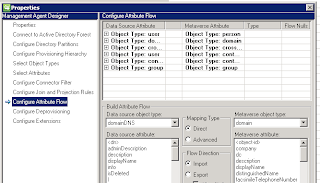
Then select the appropriate group. In my case the "Data Source Attribute" with "Object Type" user" and "Metaverse Attribute" with "Object Type: person". Then in the "Build Attribute Flow" section select the "Data source attribute" and the corresponding "Metaverse attribute" and in the "Flow Direction" section select your desired direction settings:

When you have made your selections, click "New" to add the mapping.

Funny thing was that the attribute was still added to the property, but as an Import! In the end it was a good thing because I ended up learning more about the Synchronization Service Manager. Turns out that adding the attributes is a lot easier using this application and you get a nice view to confirm that they are indeed there! Here's how to do it. On your SharePoint server run the Synchronization Service Manager, miisclient.exe. In articles you will also find it referred to as SSM or the FIM client. It is located in the C:\Program Files\Microsoft Office Servers\14.0\Synchronization Service\UIShell folder.
Select your connection:

Then right click and select properties:

Select "Configure Attribute Flow":

Then select the appropriate group. In my case the "Data Source Attribute" with "Object Type" user" and "Metaverse Attribute" with "Object Type: person". Then in the "Build Attribute Flow" section select the "Data source attribute" and the corresponding "Metaverse attribute" and in the "Flow Direction" section select your desired direction settings:

When you have made your selections, click "New" to add the mapping.
Wednesday, February 15, 2012
SharePoint 2010 - New AD Property Not Displayed
If you add a new User Profile Property and it's coming from the Active Directory the property will not be displayed on the My Sites edit profile page until you do a profile synchronization.
Saturday, January 14, 2012
SharePoint 2010 - Mapping missing LDAP atrributes
Ran into a problem when I was adding user properties for the user profile in SharePoint 2010. Followed the instructions found at http://trayontheweb.com/2011/07/20/missing-ldap-attributes-when-adding-a-new-property-to-the-user-profile-service-in-sharepoint-2010/ and I was able to add a property for the missing attribute. Had to run SharePoint PowerShell with SP_Farm credentials. Ran synchronization and the field was populated. Additional information can be found at http://blogs.msdn.com/b/tehnoonr/archive/2010/11/22/mapping-user-profile-properties-in-sharepoint-2010-to-ldap-attributes.aspx
Subscribe to:
Posts (Atom)