Translate

Friday, January 18, 2013

TSQL - Using Like in a TSQL Join

More work importing data! This time for all of the tables I imported I needed to set a foreign key field for each record to indicate who created the record.

Each table that I imported the data from has a field called "Record Owner" that is the first and last name of the record creator plus an additional code. An example would be "Bob Smith 12345".

I have a table called "AppUser" that has primary key field "ID", and a "FirstName" and a "LastName" field. In my imported tables I have a field, "CreatedBy", that is the foreign key to the "ID" field in the "AppUser" table. Because of the additional code characters in the "Record Owner" field, I had to use a TSQL "like" to accomplish the join.

Here is my final TSQL query for populating the "CreatedBy" field:

UPDATE [INformV2].[dbo].[FoOfficeReportingPerformance]
SET [CreatedBy] = qbO.ID   
FROM [INformV2].[dbo].[FoOfficeReportingPerformance]
INNER JOIN [Importsv1].[dbo].[FoOfficeReportingPerformance] qbA
ON [INformV2].[dbo].[FoOfficeReportingPerformance].[QBRecordID] = qbA.[Office performance record ID#]
INNER JOIN [INformV2].[dbo].[AppUser] qbO
ON  qbA.[Record Owner] like (qbO.[FirstName] + ' ' +  qbO.[LastName] + '%')

Table "[Importsv1].[dbo].[FoOfficeReportingPerformance]" is the originally imported data.
Table "[INformV2].[dbo].[FoOfficeReportingPerformance]" is my final table. I imported data from "[Importsv1].[dbo].[FoOfficeReportingPerformance]" into this table. It has a field "QBRecordID" that matches the primary key, "Office performance record ID#", for the records in "[Importsv1].[dbo].[FoOfficeReportingPerformance]".

Anyway, what is interesting to me here is that you can use "like" as a comparisoin operator in a TSQL JOIN!

TSQL - Bitwise Operators

I recently had to set a field by ORing three different fields in a table. The easy solution was to use the Bitwise OR operator. So in the table design in SQL Manager, the "Computed Column Specification" for the field I set the formula to (([Field1]|[Field2])|[Field3]). You can learn more about the Bitwise Operators here.

Saturday, December 1, 2012

Windows 8, 32 bit Install

Installed Windows 8 32 bit on a solid state drive in my Pentium 4 desktop. There were a few issues I ran into with the install, mainly because the system doesn't have a DVD player. What I had to do is put the drive in my laptop and install it there, and then put the drive back in the desktop. It worked but wouldn't recognize my desktop's USB network adapter, an old Linksys WUSB54G! So I put the drive back in my laptop where the internal network adapter worked just fine and I connected to my home network. Then I plugged in the Linksysadapter and Windows detected it and downloaded and installed the driver. I put the drive back in my desktop and I'm up and running and connected to the Internet! Once the Linksys was working I was also able to get an Alfa AWUS036H and a Netgear WNDA3100 running! When I connected each adapter, Windows 8 detected and installed the new device!

Friday, November 9, 2012

jQuery - DataTables Server-side Sorting

I couldn't use the server-side sorting ability of DataTables and needed to implement my own. Here's how I did it:

First - turn off DataTables sorting by setting bSort to false.

2 - Add a hidden Div for the menu for my sorting:


<div id="tabmenu" style="visibility: hidden; display: none; position: absolute; z-index: 6" class="popTableMenu">
 <table cellspacing="0" cellpadding="0">
   <tr>
     <td>
       <a id="fpopSortDn" href="#" onclick="return inSort('asc')">Sort down</a>
       <a id="fpopSortUp" href="#" onclick="return inSort('desc')">Sort up</a>    
     </td>
   </tr>
 </table>
</div>


3 - Modify the column heading, adding "onmouseover" and "onclick" events:

<th style="height:26px;" class="heading" onmouseover="inMenuHide()" onclick="inMenuShow(this, '${fieldName}');" ><s:property value="fieldLabel"/></th>


4 - Add the JavaScript to handle the mouse events:

<script type="text/javascript"<
var tSort;

function inSort(direct){
 inMenuHide();
 showLoading();
 var mID = $('#${tablename}viewID').val();
 var mAct = $('#${tablename}listActionName').val();
 $('div#divBody').load('/InForm${namespace}/'+mAct+'.action?rpp=' + $('#resPerPage').val() + '&sortBy=' + tSort + '&sortOrder=' + direct + '&viewID=' + mID + '&search=' + $('#${tablename}fastSearch').val());
 return false;
}

function inMenuShow(cell, field){
 tSort = field;
 var offset = $(cell).offset();
 var cH = $(cell).height();
 var pT = offset.top + cH;
 $("#tabmenu").offset({ top: pT, left: offset.left });
 $('#tabmenu').css("visibility","visible");
 $("#tabmenu").show("fast");
}

function inMenuHide(){
 $("#tabmenu").offset({ top: 0, left: 0 });
 $("#tabmenu").hide();
 $('#tabmenu').css("visibility","hidden");
}
</script>

Clicking on a column heading will call "inMenuShow" so that the sort memu, the hidden Div, displays below the column:
Clicking on an item in the sort menu wil call the "inSort" method. This method calls my struts action and populates the table container, "divBody", with the returned page. The page that's returned ids the sorted table.

Friday, November 2, 2012

Java - Missing User When Querying Active Directory

In an application that I'm working on I'm using the "DirContext" to query Active Directory for users and permissions. A new user wasn't showing up in the query results. It turned out that since I was filtering my search on the City and he was set up without having an entry for City he wouldn't be returned in the search.

Friday, October 26, 2012

jQuery - Append an Image and Handle the Click Event

In a web application that I developed I was asked to modify the contents of on input tag when a buttom was clicked. Since the application was designed to use the same JSP page for all table edits I didn't want to create a custom JSP page for this table. So I added the button using jQuery.

Here is the JSP for the page:

<jsp:include page="../genBase/recordEdit.jsp" />
<script>
$(document).ready(function(){ 
$('#dispurlLinkToFile').after(' <img title="Generate URL location" id="imgUrlLinkToFile" style="border-top-color: currentColor; border-right-color: currentColor; border-bottom-color: currentColor; border-left-color: currentColor; border-top-width: 0px; border-right-width: 0px; border-bottom-width: 0px; border-left-width: 0px; border-top-style: none; border-right-style: none; border-bottom-style: none; border-left-style: none;" alt="Generate URL location" src="../images/max1t.gif"/>');
$('#imgUrlLinkToFile').click(function() {
 $('#dispurlLinkToFile').val('https://ABC.XYZ.org/ProposalDev/Proposals/'+$('#dispinternalRefNum').val().replace(/-/g,"_")+'.zip');});
});
</script>

Here's what the page is doing:
The global edit page, "recordEdit.jsp", is loaded.
The jQuery script, "$('#dispurlLinkToFile').after", is adding an icon after the input field with the id of "dispurlLinkToFile". The image tag is assigned an id of "imgUrlLinkToFile".
The jQuery script for the "imgUrlLinkToFile" click function takes the vale from the tag with the id "dispinternalRefNum", replaces "-" with "_", which gets added to "https://ABC.XYZ.org/ProposalDev/Proposals/" and written to "dispurlLinkToFile".
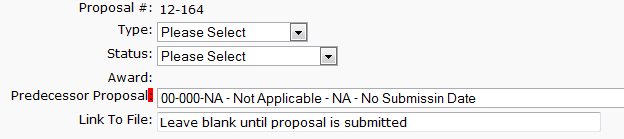
So we go from our original:

To the same with or image added:
Then when the button is clicked the field is populated:

Friday, October 19, 2012

SharePoint 2010 - External List Authentication

Another thing that constantly gets me - whenever you set up an secure store application and do not set it up as a group type (individual is the default) you will get the "Click here to authenticate" link on the list in SharePoint!