Translate

Friday, June 15, 2012

AJAX - Browser History

One of the issues with using AJAX in a web site is that the browser history does not work. I spent a few days trying out quite a few of the solutions that you can find on the web and I was unable to find one that worked consistently in my application. The only option left was to add my own history and back button to my application.

The script file, rgUrlHistory.js:

var rgUrlStack = new Array();
var rgIdx = 0;

function rgPushAction(mAct, mApp, mID, mType) {
  rgObj = [];
  rgObj.action = mAct;
  rgObj.appID = mApp;
  rgObj.type = mType;
  rgObj.id = mID;
  rgUrlStack.push(rgObj);
  //limit to 10 items
  if (rgUrlStack.length > 10) rgUrlStack.splice(0,1); 
  rgIdx = rgUrlStack.length;
}

function rgBackAction() {
  var rgPop;
  //if we are at the top of the stack we need to pop this value because the first value popped is the current URL
  if (rgUrlStack.length == rgIdx) rgUrlStack.pop();
  //if we still have a value, pop it
  if(rgUrlStack.length > 0){
    rgPop = rgUrlStack.pop();
    //always keep one value on the stack
    if(rgUrlStack.length == 0) rgUrlStack.push(rgPop);
  }
  return rgPop;
}


In my application I call rgPushAction to save my URL and some additional information:

onclick="rgPushAction('%{urlFkey}','%{appTableID}','%{ID}','%{currentAppTable.type}');

On the menu bar in my web application I added a left arrow icon and call the the following JavaScript when the image is clicked:

function runBackQuery(){
   $.publish('HideViewMenu');
   var rgObj = rgBackAction();
   if(rgObj != ""){
     listView(rgObj.type, rgObj.appID, rgObj.id)
     $.post(rgObj.action, function(result){
          $("div#divBody").html(result);
        });
     $.publish('ShowDivBody');
   }
}

This script uses jQuery post with the URL we saved returned in rgObj.action to populate our target Div tag, divBody. "listView" is just another function that is called with the additional information we saved in the rgObj object. That's all there is to doing your own browser history for your AJAX actions.

Tuesday, May 29, 2012

Internews - Learn to Communicate with Crisis-Affected Communities

A new, free online learning course, Communication is Aid, aims to raise awareness and build basic skills for communicating effectively with crisis-affected communities, before and after an emergency breaks.

Read the rest of the story here.

Wednesday, May 23, 2012

Internews - Armenian Media Pioneer Hopes to Engage the Public through Citizen Reporting Gaming Platform

In October 2010, Armenian schoolchildren documented numerous cases of physical abuse at the hands of teachers using the cameras on their mobile phones. However, as Armenian journalist Seda Muradyan noted in her 2011 Knight Fellowship presentation at Stanford University, few people saw the videos until six months or even a year after they were shot, when they were uploaded online and swiftly went viral.

Read the rest of the story here.

Monday, May 21, 2012

Java - Calculate Date Frequency

I needed to calculate the biweekly, monthly, or quarterly date frequency and create a list of dates. It's easy using Joda Time.


Here is my Java class. Just pass the start date and end date to the method.

package org.inewsnet.service;

import java.util.ArrayList;
import java.util.Date;
import java.util.List;
import org.joda.time.LocalDate;
import org.joda.time.Period;

/**
 * Methods to calculate biweekly, monthly, and quarterly date  frequencies
 * @author Richard Golebiowski
 *
 */
public class DateTimeService {
    /**
     * Calculates the dates for the Biweekly frequency
     * @param dtStart  the tart date
     * @param dtEnd    the end date
     * @return         a list of dates
     */
    public List<Date> getBiwekly(Date dtStart, Date dtEnd){
        List <Date> lstDate = new ArrayList<Date>();
        LocalDate start = new LocalDate(dtStart);
        LocalDate end = new LocalDate(dtEnd);
        Period period = Period.weeks(2);
        Period current = Period.ZERO;
        while (true) {
            LocalDate candidate = start.plus(current);
            if (candidate.isEqual(end) || candidate.isAfter(end)) {
                lstDate.add(dtEnd); 
                return lstDate;
            }
            else {
                lstDate.add(candidate.toDate());      
            }
            current = current.plus(period);
        }
    }
    
    /**
     * Calculates the dates for the Monthly frequency
     * @param dtStart  the tart date
     * @param dtEnd    the end date
     * @return         a list of dates
     */
    public List<Date> getMonthly(Date dtStart, Date dtEnd){
        List <Date> lstDate = new ArrayList<Date>();
        LocalDate start = new LocalDate(dtStart);
        LocalDate end = new LocalDate(dtEnd);
        Period period = Period.months(1);
        Period current = Period.ZERO;
        while (true) {
            LocalDate candidate = start.plus(current);
            if (candidate.isEqual(end) || candidate.isAfter(end)) {
                lstDate.add(dtEnd); 
                return lstDate;
            }
            else {
                lstDate.add(candidate.toDate());                
            }
            current = current.plus(period);
        }
    }

    /**
     * Calculates the dates for the Quarterly frequency
     * @param dtStart  the tart date
     * @param dtEnd    the end date
     * @return         a list of dates
     */
    public List<Date> getQuarterly(Date dtStart, Date dtEnd){
        List <Date> lstDate = new ArrayList<Date>();
        LocalDate start = new LocalDate(dtStart);
        LocalDate end = new LocalDate(dtEnd);
        Period period = Period.weeks(13);
        Period current = Period.ZERO;
        while (true) {
            LocalDate candidate = start.plus(current);
            if (candidate.isEqual(end) || candidate.isAfter(end)) {
                lstDate.add(dtEnd); 
                return lstDate;
            }
            else {
                lstDate.add(candidate.toDate());                
            }
            current = current.plus(period);
        }
    }
     
}

Friday, May 18, 2012

Internews - New Report: Closing the Loop — Responding to Information Needs in Haiti

Information matters, especially for individuals affected by severe crises like the 2010 earthquake in Haiti. But critically, new research shows that listening to audiences may be just as important.

Read the rest of the story here.

JQuery Offset Error

I was working on a drop-down menu that was fixed at the top of the page. It worked in Firefox, but not IE or Chrome. By using the developer tools in Chrome I discovered that there was an error on getting the offset position. The error message was "Cannot read property 'tagName' of null" and was being caused by the jQuery dimensions plugin. This plugin was used by the previous menu and wasn't needed any more so I removed it and the drop-down menus worked!

Friday, May 11, 2012

Using SQL to make a SharePoint Contact List

I needed to make a list of contact information for all of our offices using the contact information in Active Directory. All of the "regular" solutions were not applicable because the offices were contained in the same Organizational Unit as some other contacts, requiring the offices be filtered out from the other contacts. The solution was to use the SQL server that is used to host the databases for the SharePoint site to query AD and return the filtered list.

The first step is to create the SQL Linked server. I used SQL Management Studio to do this. Under "Server Objects, right click on "Linked Servers" and the click "New Linked Server".

Here are the settings you need to make. The "Data Source" is the name of your AD server.

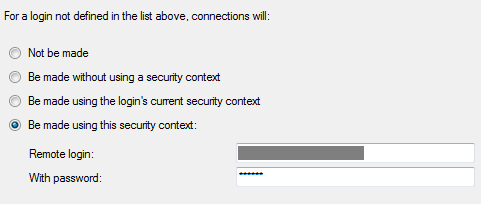
On the "Security" page, enter the security settings:


Create the view:

CREATE VIEW [dbo].[vwWxyzOffices]
AS
SELECT sn[Country], homephone[Business Phone], l[City], streetAddress[Street Address], postalCode[Postal Code],
mail[Email], facsimileTelephoneNumber[Fax], mobile[Mobile Phone], info[Notes], wWWHomePage[Website]
FROM OPENQUERY(ADSI,
'SELECT givenName, sn, homephone, l, streetAddress, postalCode, facsimileTelephoneNumber,
mail, mobile, info, wWWHomePage
FROM ''LDAP://OU=Contacts,DC=Wxyz,DC=local''
WHERE objectClass = ''contact''  and givenName = ''Wxyz''')
GO

Finally, add the view into SharePoint as an external data source and use it in your SharePoint list!