Showing posts with label Access. Show all posts
Showing posts with label Access. Show all posts
Thursday, April 4, 2013
SQL - Listing All of the Records From Multiple Tables
I was asked to provide a list of all of the records from some look up tables that I use for my project. There are almost 60 look up tables! I spent some time thinking about how to do this in the SQL database. Then I realized, the easy answer is to connect MS Access to the SQL server and then select the tables I need and import them into Access.

Friday, March 1, 2013
XML - Using XQuery to Transform an XML File
What I learned in the Introduction to Databases came in handy. I had a log file in XML that I needed to query on to get some information. Unfortunately because of the structure of the file I wasn't able to query on it to get the data I needed and I wasn't able to import it into Access. Using XQuery, I transformed the file into a format that I could import into Access.
Here is a section of the original XML file:
This is the format I needed it to be in:
This is the XQuery Expression I used to transform the XML file:
I used Kernow to run the expression and get my results.
Here is a section of the original XML file:
<BB>
 <Content DateTime="2/28/2013 8:00:16 AM" Account="INTERNEWS\lkuncan" Content="Deleted" />
  <Content DateTime="2/28/2013 8:00:16 AM" Account="INTERNEWS\cnedlin" Content="Deleted" />
  <Content DateTime="2/28/2013 8:00:16 AM" Account="INTERNEWS\cdfield" Content="Deleted" />
  <Content DateTime="2/28/2013 8:00:16 AM" Account="INTERNEWS\ograw" Content="Deleted" />
This is the format I needed it to be in:
<bRec>
   <Account>INTERNEWS\lkuncan</Account>
   <Content>Deleted</Content>
</bRec>
<bRec>
   <Account>INTERNEWS\cnedlin</Account>
   <Content>Deleted</Content>
</bRec>
<bRec>
   <Account>INTERNEWS\cdfield</Account>
   <Content>Deleted</Content>
</bRec>
<bRec>
   <Account>INTERNEWS\ograw</Account>
   <Content>Deleted</Content>
</bRec>
This is the XQuery Expression I used to transform the XML file:
for $b in doc("Blog.xml")/BB/Content
return
<bRec>
  <Account> { $b/data(@Account) } </Account>
  <Content>{ $b/data(@Content) }</Content>
</bRec>
I used Kernow to run the expression and get my results.
Monday, January 16, 2012
MS SQL Import Truncation Error
I was having a problem importing an Excel spreadsheet into SQL Server that I just couldn't figure out.

After many attempts I decided to try importing into MS Access. It worked and it showed me where the errors are!
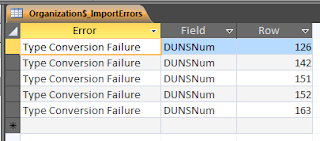
After fixing the errors I imported the Access table into SQL Server.

After many attempts I decided to try importing into MS Access. It worked and it showed me where the errors are!

After fixing the errors I imported the Access table into SQL Server.
Subscribe to:
Posts (Atom)